
HOW TO PAY
Below you’ll find a video and a written instructions on how to pay. Make sure to contact our customer service on chat if you need help or get stuck.
IMPORTANT UPDATE PLEASE READ Per instructions from CashApp, when taking photos of your Driver’s License to verify your ID, they recommend using a BLACK/DARK piece of paper or furniture as your background in a well lit room.
CASHAPP
PAYPAL
Introduction
Your safety and privacy is just as important as the safety and privacy of each and every member of this club. This is one of our guiding principles and one of the main reasons we’ve elected to take payment the way we do. Before we start the explanation and step-by-step process a note.
A traditional payment method is any method that is tied to your real name and can be traced back to you for the purchase you made. A company taking your payment can implicate you should they get indicted by law enforcement. When buying cannabis online the last thing you need is to have that purchase linked to you in one way or another. Avoid such websites, avoid such payment methods. They are not safe and you are not safe as a result.
The goal of buying cannabis online is to have a worry free, secure, private experience that has no chance of hurting you. As such we made the decision early on to only accept BitCoin as a payment method. It provides security, anonymity and privacy. There is no way for anyone to know what you purchased with the BitCoin you used.
A final note. The process of setting up a BitCoin payment method on your smartphone or computer is a small, one time inconvenience. That is, the time and effort it takes you to set it up once. After it is setup, it is as easy as using PayPal. This inconvenience provides you with peace of mind, safety and privacy. We provide the visual guide below. We suggest you follow it on a separate computer/tablet/smartphone, with your main smartphone free to work on. Its no more complicated than setting up an Amazon account. You just need time and patience. All in all it takes less than 15 minutes.
Below you will find step by step instructions.
TIME : 3 MINUTES
Final Step – Pay For Your Order
We’ve updated this last step to be easier to follow. Its a bit longer, but should be an easy step by step for those whom are less comfortable with technology.
In order to best help you through this last step, lets first determine if you are using just your smartphone to place this order. Or if you are using a smart phone and a second device, like a tablet, laptop or computer. Are you using just a smartphone or a smartphone and another device? Open the tab below by clicking/touching on it.
- Once you get the checkout,make sure all of your information is accurate and click on the Place Order button.

- You’re almost done. The next screen looks like this.
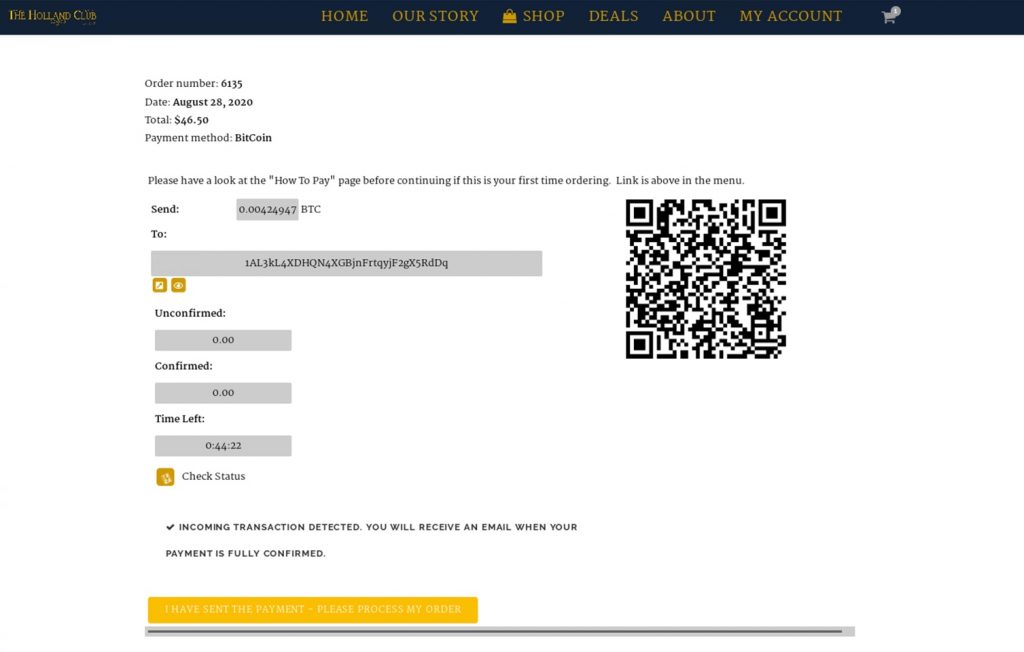
- Now open CashApp/PayPal. Copy the To: address. This is where you will send payment.
- Complete the payment and you’re done with CashApp/PayPal. Finally go back to your browser and press the button “I HAVE SENT THE PAYMENT – PLEASE PROCESS MY ORDER”. And you’re done. Great job. Now we will take it from here.